


Bằng cách nhấp vào Đăng nhập, bạn đồng ý Chính sách bảo mật và Điều khoản sử dụng của chúng tôi. Nếu đây không phải máy tính của bạn, để đảm bảo an toàn, hãy sử dụng Cửa sổ riêng tư (Tab ẩn danh) để đăng nhập (New Private Window / New Incognito Window).


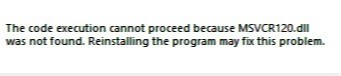
The error message you encountered indicates that the MSVCR120.dll file is missing on your system. This DLL (Dynamic Link Library) file is associated with the Microsoft Visual C++ Redistributable package.
To resolve this issue, you can try the following steps:
Reinstall the program: If the error message is specific to a particular program, try reinstalling that program. Sometimes, during installation, the necessary DLL files are not properly installed.
Install the Microsoft Visual C++ Redistributable package: Visit the Microsoft Download Center and search for "Microsoft Visual C++ Redistributable". Download and install the appropriate package for your system. This package includes the required DLL files.
Update Windows: Make sure your Windows operating system is up to date. Install any available updates, including service packs and security patches.
Perform a system file check: Open the Command Prompt as an administrator and run the command "sfc /scannow". This will scan and repair any corrupted system files, including missing DLL files.
Run a malware scan: It's possible that malware or viruses on your system may have caused the DLL file to be deleted or corrupted. Run a reliable antivirus or anti-malware scan to ensure your system is clean.
If none of the above solutions resolve the issue, you can search for the specific DLL file online and manually download it from a reputable source. Make sure to verify the authenticity and integrity of the file before proceeding.

Hôm nay bạn thế nào? Hãy nhấp vào một lựa chọn, nếu may mắn bạn sẽ được tặng 50.000 xu từ Lazi
| Vui | Buồn | Bình thường |


 AI Chat





 Xem thêm


 Thưởng th.04.2026
 Bảng xếp hạng